 José Adorno/BGR
A few months after writing how great my M1 Pro MacBook Pro has been running four years after purchasing it (mostly as a way to prevent FOMO regarding the M4 MacBook Pro), I started to have an ongoing issue with the file browser tool on macOS. Whenever I need to export an image with Pixelmator Pro, upload a photo on BGR, or even send a document through email, I would see the Mac’s spinning wheel.
Suddenly, my workhorse of a MacBook Pro started to feel like an old computer that couldn’t perform basic tasks. This issue started with one of macOS Tahoe 26.1 betas, and I honestly assumed it would have been solved as soon as Apple released the final version of the software.
Unfortunately, with the release of macOS Tahoe 26.1 last week, I was still experiencing the lag issue with the file browser tool on macOS. However, I wasn’t the only one experiencing the issue, and a post on X by Basic Apple Guy showed exactly what the issue was and how to fix it.
Workaround for Mac’s slow file browser issue
 José Adorno/BGR
On X, Basic Apple Guy wrote: “Running macOS 26.1 and noticing the file browser is painfully slow when closing, saving, or opening files. Plenty of SSD space and no memory-hogging apps. Restarting didn’t help. Anyone else seeing this?” Then, user Landin McSorley replied saying the issue wasn’t specific to macOS Tahoe 26, and more importantly, didn’t have anything to do with the Liquid Glass experience or having an external hard drive.
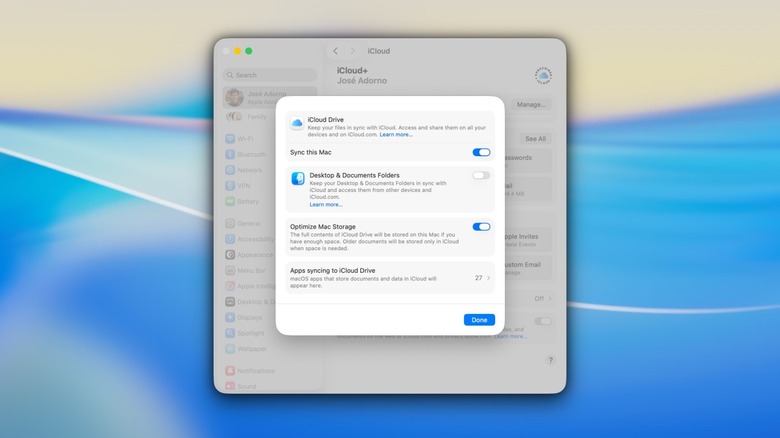
In fact, it turns out that this is a bug related to the Desktop sync with iCloud, which makes the file browser tool respond much more slowly than it should. To fix it, users need to do the following:
- Open the Settings app on the Mac.
- Click on your Apple Account and then iCloud.
- Click iCloud Drive and toggle off Desktop & Documents Folders.
While toggling this feature off will remove the sync between your Mac and all your devices over iCloud, it instantly resolves the issue. According to McSorley, he was able to activate the feature once again after a few weeks without running into the same bug. In my experience, toggling the feature back on makes the issue reappear, so some Mac users might want to just turn off this feature altogether until Apple delivers a fix.